Reference words
Words like this, it, the, one and some refer to ideas elsewhere in the text. A sentence containing one of these is almost never the first sentence.

Reorder Paragraphs tests how well you can follow the organisation of an academic text and understand how it is joined together. Sentences appear in a random order on the LEFT panel — drag them to the RIGHT panel and put them in the correct order. On this page: an overview, the Pearson exam interface, top strategies (Before / During the test), common mistakes, points to remember and a full drag-and-drop simulator with the most-repeated 2026 questions.
Length of text:
around 50 – 110 words
Number of text boxes:
4 – 5
Interaction:
drag & drop
Number of these tasks:
2 – 3
Total time for reading tasks:
29 – 30 minutes
You will see instructions and two panels. The left panel has sentences in the wrong order; the right panel is empty. Drag each sentence into the right panel, putting them in the correct order. You can move boxes around as much as you like — back to the left panel, or up and down within the right panel.
Task
Reorder Paragraphs
Reading
Overall
Your voice → analysed by AI → contributes 9% to Reading and 1% to Overall.
Official PTE School walkthrough — how to drag, re-order and check your answer for Reorder Paragraphs.
The screen below is annotated with green markers (1–5). Hover each one to see what it does — the timer, the instructions, the LEFT (source) panel, the RIGHT (your answer) panel, and the Next button. Practise dragging boxes from the left panel to the right panel and reordering them up or down. Press 'Show correct answer' when you're ready to check.
Annotated walkthrough of the actual Pearson screen. Drag sentences from the left panel to the right panel. Drop a sentence ABOVE another to insert it in front; drag back to the left panel to remove it from your answer.
The text boxes in the left panel have been placed in a random order. Restore the original order by dragging the text boxes from the left panel to the right panel — or click a box and use the arrow buttons.2Read the instructions: drag boxes from the LEFT panel to the RIGHT panel and put them in the correct order.
Hover the green markers to see what each part of the screen does.
Skill assessed
Reading
Score weight
up to9points
The AI scorer checks
Criterion
Following a logical or chronological sequence.
Criterion
Identifying supporting points or examples.
Criterion
Identifying relationships between sentences in a text.
Vocabulary
Understanding academic vocabulary and inferring unfamiliar words from context.
Comprehension
Comprehending abstract and concrete information.
Make sure you're familiar with how sentences in a text link together. Recognising cohesive devices will help you work out the order of the text because they show the relationship between sentences. Here are some examples.
Four cohesive devices to train your eye on. Notice them in every academic paragraph you read.
Words like this, it, the, one and some refer to ideas elsewhere in the text. A sentence containing one of these is almost never the first sentence.
Linkers like however, as a result and in fact show the relationships between ideas. They tell you a sentence depends on something said earlier.
The + noun sometimes refers back to where the noun was mentioned before. A / an + noun can show that it's the first time the noun is being mentioned.
The same thing can be re-named across sentences — e.g. a car might be referred to as the automobile and his new vehicle in the same text. Following the chain reveals the order.
Practise reading academic texts from websites, textbooks or journals. To better understand the connection and flow of sentences, choose a paragraph and do the following.
Analyse the first sentence, asking yourself: 'Is this sentence before all the others?' Decide whether or not it communicates the main idea of the paragraph it's in or acts as an introduction to the other sentences.
Highlight all the words or phrases in the passage that are used for cohesion. Decide what each cohesive word or phrase does — does it refer to another thing or idea in the text, or does it show the relationship between two ideas?
Highlight all the articles (a/an and the). Decide why these articles are used. Are they used when a thing is mentioned for the first time? Does the article change when the thing is mentioned again later?
Look at the text and decide if the information flows logically from one sentence to the next. For example, does it follow a sequence such as: 1) topic, 2) opinion on the topic, 3) detail / reason or ideas, 4) explanation, 5) examples. Or does it follow another type of sequence?
You identify the topic sentence first.
You don't choose a sentence with linking words or references to earlier information as the first sentence.
You manage time effectively — 2–3 minutes per task.
You don't spend too much time on one task; keep an eye on the timer.
You attempt the task even if you're unsure.
You don't leave this task unanswered — guessing is better than no response.
You read the whole right panel again to double-check.
You don't finish before reading the whole text in the right-hand panel to check it makes sense.
Try this Reorder Paragraph without the markers and without a time limit. Skim, find the topic sentence, then build the order step-by-step. Press 'Show correct answer' to check yourself.
Same Pearson-style screen as the real test. Drag sentences from the left panel to the right panel in the correct order, then press 'Show correct answer'.
The text boxes in the left panel have been placed in a random order. Restore the original order by dragging the text boxes from the left panel to the right panel — or click a box and use the arrow buttons.
Private to you — tick each item you actually did. Saved on this device only.
Send a screenshot of your reorder on WhatsApp and our trainers will explain the cohesion clues that prove the correct order — and why each wrong placement is wrong.
💬 Get evaluated on WhatsApp
Watch the most frequent mistakes test-takers make in Reorder Paragraphs — and how to avoid each one.
No special knowledge required
The reading texts are designed to test only English. You don't need any special knowledge — it doesn't matter if you're unfamiliar with the subject. All the information you need is in the text.
13–18 reading tasks total
The Reading section has 13–18 tasks. The timer counts down across ALL reading tasks together — when you're satisfied with your response, click 'Next' to move on.
Partial-credit scoring
If all text boxes are in the correct order you receive the maximum score. If one or more boxes are in the wrong order, partial credit applies — each pair of consecutive sentences in the correct order earns a point.
Each question below opens in the FULL Pearson-style drag-and-drop simulator. The sentences are SHUFFLED on the left panel — drag them across into the correct order on the right. Press Show correct answer on each one to check yourself. Each correct answer is also listed below the simulator after you reveal it.
Most-repeated 2026 Reorder Paragraph #1. Drag the sentences from the left panel to the right panel in the correct order, then press 'Show correct answer'.
The text boxes in the left panel have been placed in a random order. Restore the original order by dragging the text boxes from the left panel to the right panel — or click a box and use the arrow buttons.
Most-repeated 2026 Reorder Paragraph #2. Drag the sentences from the left panel to the right panel in the correct order, then press 'Show correct answer'.
The text boxes in the left panel have been placed in a random order. Restore the original order by dragging the text boxes from the left panel to the right panel — or click a box and use the arrow buttons.
Most-repeated 2026 Reorder Paragraph #3. Drag the sentences from the left panel to the right panel in the correct order, then press 'Show correct answer'.
The text boxes in the left panel have been placed in a random order. Restore the original order by dragging the text boxes from the left panel to the right panel — or click a box and use the arrow buttons.
Most-repeated 2026 Reorder Paragraph #4. Drag the sentences from the left panel to the right panel in the correct order, then press 'Show correct answer'.
The text boxes in the left panel have been placed in a random order. Restore the original order by dragging the text boxes from the left panel to the right panel — or click a box and use the arrow buttons.
Most-repeated 2026 Reorder Paragraph #5. Drag the sentences from the left panel to the right panel in the correct order, then press 'Show correct answer'.
The text boxes in the left panel have been placed in a random order. Restore the original order by dragging the text boxes from the left panel to the right panel — or click a box and use the arrow buttons.
Most-repeated 2026 Reorder Paragraph #6. Drag the sentences from the left panel to the right panel in the correct order, then press 'Show correct answer'.
The text boxes in the left panel have been placed in a random order. Restore the original order by dragging the text boxes from the left panel to the right panel — or click a box and use the arrow buttons.
Read the text boxes in order to understand the main idea of each one. You can do this by noting the key words.
Next, use the key words to form an overall idea of what the original text is about. This will help you find the logical order for the ideas in the text boxes:
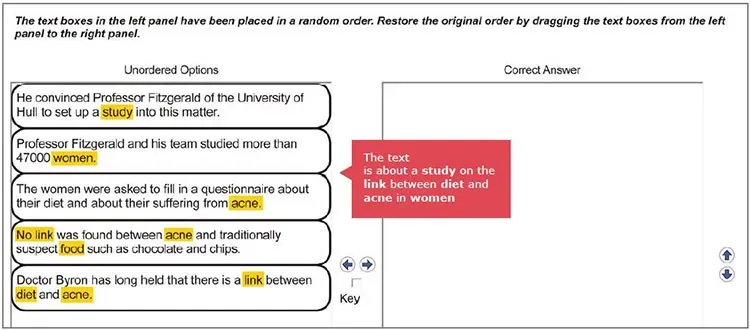
Every well-written paragraph has a topic sentence. It is usually a clear statement about the topic, and all the other sentences are related in some way to this sentence.
The topic sentence can stand alone; it does not begin with a linker or a pronoun that refers back to something or someone (e.g. 'he' or 'this'), nor does it refer back to information or actions previously mentioned through the use of things like passive verb tenses (e.g. 'No link was found'):
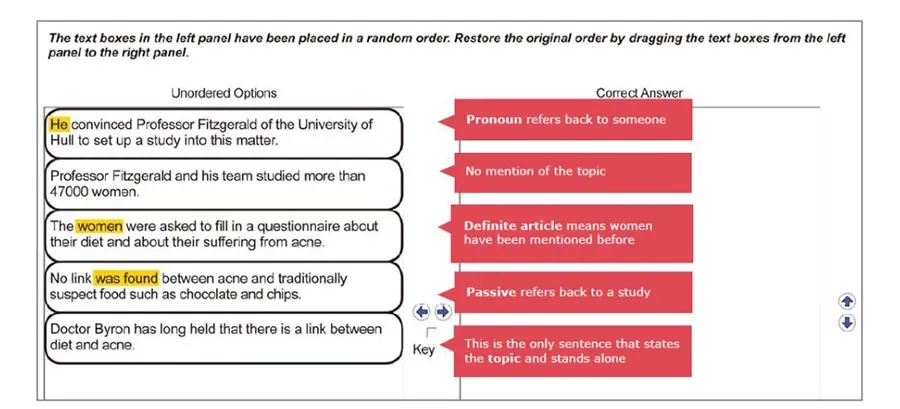
Your response is judged on your ability to understand the organisation and cohesion of an academic text. If all text boxes are in the correct order, you receive the maximum score points for this question type. If one or more text boxes are in the wrong order, partial credit scoring applies — you earn one point for each pair of consecutive sentences placed in the correct order. This question type affects the scoring of only Reading.
Reorder Paragraphs is NOT scored per blank — there are no blanks. The scoring engine looks at every pair of neighbouring sentences in your answer and awards 1 point each time those two sentences are in the correct order relative to each other. The maximum score equals (number of sentences − 1). One misplaced sentence can cost you up to TWO pairs, because it breaks the chain on both sides. There is no negative marking, so always submit a complete order.
Coach tip · Max score = (sentences − 1). 4 boxes → max 3 points; 5 boxes → max 4 points.